Linux Storage Networking, Part 4 of 4.
Part 1: Linux iSCSI Multipath: Fix ARP Flux and NIC Binding
Part 2: LACP vs Multipath: Linux iSCSI and NVMe/TCP
Part 3: Routed iSCSI and NVMe/TCP: Linux Routes and VRFs
Ok. We have interfaces, routes, ARP settings and storage bindings. Now we need all of that on OpenShift, for iSCSI or NVMe/TCP.
Red Hat Enterprise Linux CoreOS is still Linux. Same routing tables, same ARP behavior, same initiators, so everything from the first three parts still applies. What changes is how you get the configuration onto a node, how it gets to the rest of the cluster, and what happens when you change it later.
Here’s the plan. The storage interfaces and routes go in a NodeNetworkConfigurationPolicy (NNCP). The sysctls and initiator files go in a MachineConfig. The CSI driver gets told which interfaces to use. Then we prove it out on one node before touching the others.
It’s very tempting to oc debug into a node and fix the one line you know is wrong. On OpenShift that gets you one fixed node, and either a degraded pool or a change that never reaches the other nodes. I’d rather the cluster know what we changed.
If you need the networking background, start with Linux interface binding and ARP flux, LACP versus storage multipath, or routed iSCSI, NVMe/TCP and VRFs. This one is about getting those settings onto nodes, and changing them later without surprising anyone’s workloads.
NNCP or MachineConfig: which owns the storage configuration?
Two mechanisms do most of the work here:
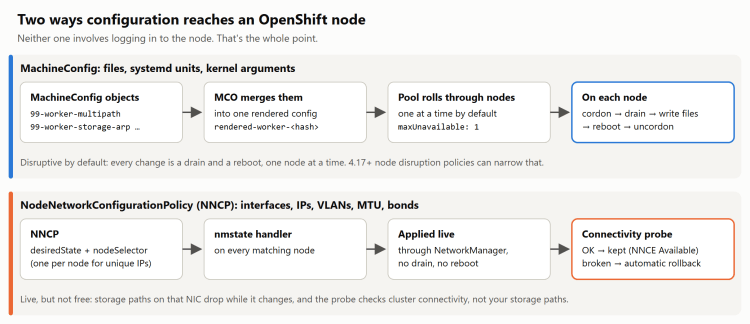
A MachineConfig carries files, systemd units and kernel arguments. The Machine Config Operator (MCO) merges everything for a pool into a rendered config and rolls it out node by node. For the file changes in this post, plan on a drain and reboot per node. Not every MachineConfig change reboots, and node disruption policies (more on those later) can change that, but a reboot is the safe assumption.
An NNCP goes through the Kubernetes NMState Operator, which configures host networking through NetworkManager. Interface and route changes apply live, no reboot. If a change breaks the node’s connectivity, NMState’s checks can roll it back. Those checks are about the node reaching the cluster, though. They don’t know anything about your storage I/O.
Here’s how I’d split it:
| Configuration | Owner in this design |
|---|---|
| Storage NICs, VLANs, IPs, MTU and routes | NNCP |
| ARP and reverse-path sysctl file | MachineConfig |
multipath.conf, iscsid.conf, iSCSI iface files and udev rules | MachineConfig |
| Required kernel arguments | MachineConfig |
| Unique initiator IQN and host NQN | Per-node generation or the supported storage integration |
Watch the last row. A MachineConfig puts the same file on every node in the pool, so it can’t hand out one literal IQN or host NQN. If a systemd unit generates the identity, have it create a unique value only when one doesn’t exist yet, and before the initiator starts. Generating a new one on every boot is its own problem.
Each interface gets exactly one owner, too. If NNCP manages a storage NIC, don’t also ship a .nmconnection profile for it in a MachineConfig.
Keep the storage network separate from br-ex
With OVN-Kubernetes, br-ex normally carries the node’s primary network. Put storage on it and storage shares bandwidth with everything else, and every storage network change is now a change to the cluster’s primary connectivity. I don’t want to be in that position.
So I’d use dedicated secondary NICs. NNCP manages them and their specific routes, and the primary network keeps its default route.
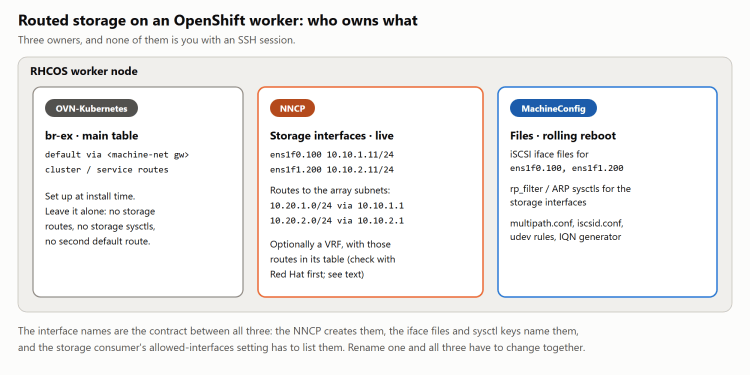
For the examples below, worker-1 has ens1f0.100 on Fabric A and ens1f1.200 on Fabric B. Their host addresses are 10.10.1.11 and 10.10.2.11. The array prefixes are 10.20.1.0/24 and 10.20.2.0/24.
Swap in your own names and addresses. The initiator matches interfaces by name, so if the iface record says one VLAN name and the node has another, it won’t find the interface.
Put the storage routes in the NNCP
With the NMState Operator installed, here’s a policy for one node. It assumes the parent NICs are dedicated to storage and the switch VLANs and MTU are already set end to end:
apiVersion: nmstate.io/v1kind: NodeNetworkConfigurationPolicymetadata: name: storage-l3-worker-1spec: nodeSelector: kubernetes.io/hostname: worker-1 maxUnavailable: 1 desiredState: interfaces: - name: ens1f0 type: ethernet state: up mtu: 9000 - name: ens1f1 type: ethernet state: up mtu: 9000 - name: ens1f0.100 type: vlan state: up mtu: 9000 vlan: base-iface: ens1f0 id: 100 ipv4: enabled: true dhcp: false address: - ip: 10.10.1.11 prefix-length: 24 - name: ens1f1.200 type: vlan state: up mtu: 9000 vlan: base-iface: ens1f1 id: 200 ipv4: enabled: true dhcp: false address: - ip: 10.10.2.11 prefix-length: 24 routes: config: - destination: 10.20.1.0/24 next-hop-address: 10.10.1.1 next-hop-interface: ens1f0.100 table-id: 254 - destination: 10.20.2.0/24 next-hop-address: 10.10.2.1 next-hop-interface: ens1f1.200 table-id: 254
No new default route. The storage prefixes get specific routes in the main table, and the node’s default stays where it was. Never add a 0.0.0.0/0 route on a storage interface. It competes with the default route on br-ex, and the node’s cluster networking breaks in creative ways. NMState’s connectivity check might roll it back, but “might” isn’t a plan.
Save it as storage-l3-worker-1.yaml, apply it to the first node, and check the policy and its enactment:
oc apply -f storage-l3-worker-1.yamloc get nncp storage-l3-worker-1oc get nnceoc get nnce worker-1.storage-l3-worker-1 -o yaml
Each node gets its own policy with its own addresses. Apply them one at a time. maxUnavailable: 1 only limits a single policy, so it won’t stop several policies you submit together from all landing at once. Red Hat calls this out in the NMState documentation.
And remember that routes apply live. Adding a more specific route can move existing traffic, and removing one can drop sessions on the spot. Treat either like a network change and recheck the paths afterward.
Deliver the sysctls with MachineConfig
I’d write this in Butane and let it generate the MachineConfig. This uses the OpenShift 4.20 schema; use whichever one matches your cluster and Butane version.
variant: openshiftversion: 4.20.0metadata: name: 99-worker-storage-arp labels: machineconfiguration.openshift.io/role: workerstorage: files: - path: /etc/sysctl.d/99-storage-arp.conf mode: 0644 overwrite: true contents: inline: | net.ipv4.conf.ens1f0/100.arp_ignore = 2 net.ipv4.conf.ens1f0/100.arp_announce = 2 net.ipv4.conf.ens1f0/100.rp_filter = 2 net.ipv4.conf.ens1f1/200.arp_ignore = 2 net.ipv4.conf.ens1f1/200.arp_announce = 2 net.ipv4.conf.ens1f1/200.rp_filter = 2
butane --strict --pretty 99-worker-storage-arp.bu \ -o 99-worker-storage-arp.yamloc apply -f 99-worker-storage-arp.yaml
The slash in ens1f0/100 is on purpose. In this key format it stands in for the dot in the VLAN name.
I’ve scoped these to the two storage VLANs. Setting all would change the effective value on every interface, and default changes what new interfaces inherit. Neither is needed here.
This per-fabric routed layout would pass strict reverse-path filtering as it is. I’ve used loose mode anyway so the asymmetric layouts from part three still work; use whatever your supported design calls for. If you’re on a single shared subnet instead, go back through the binding and ARP requirements in part one.
Check the live values once the VLANs are up, and again after a reboot. The sysctl has to be applied after the interface exists, and a file on disk doesn’t tell you that happened.
The iSCSI iface files need iface.net_ifacename set to ens1f0.100 and ens1f1.200. Put them where your RHCOS and storage integration versions expect them. The directory another distribution uses isn’t necessarily the one the initiator reads here.
Configure the CSI driver to use both storage interfaces
On OpenShift, something else usually does the attach and login, either a CSI driver or a storage platform. Creating two interfaces doesn’t mean it’ll use both.
Portworx, for example, uses PURE_ISCSI_ALLOWED_IFACES to pick interfaces. For this layout that would be ens1f0.100,ens1f1.200, with the matching iface records in place. Check the Portworx installation instructions for your version.
Then attach a test volume and look at the node. Are the sessions coming from the right interfaces? Are the portals on the matching fabric? Is the initiator still trying, and failing, to reach the other fabric’s portals? iscsiadm -m session -P 3 answers the first two, and a journalctl -u iscsid full of login retries answers the third.
Drivers can also hang on to existing sessions after a configuration change. Find out how yours applies new interface settings to volumes that are already attached, because those volumes may not pick up the new paths right away.
A storage VRF on OpenShift, if you need one
The VRF reasoning from part three still applies. But before you put host storage interfaces into a VRF next to OVN-Kubernetes, make sure that’s supported for your OpenShift release, platform and storage integration. nmstate having a VRF schema doesn’t mean the rest of the stack supports it.
For a lab, keep the VLAN and parent interfaces from the NNCP above and add this under spec.desiredState.interfaces:
- name: vrf-storage type: vrf state: up vrf: port: - ens1f0.100 - ens1f1.200 route-table-id: 100
Then replace the policy’s routes with the following. This goes into the same policy. Don’t create a second policy managing the same NICs:
routes: config: - destination: 10.20.1.0/24 next-hop-address: 10.10.1.1 next-hop-interface: ens1f0.100 table-id: 254 state: absent - destination: 10.20.2.0/24 next-hop-address: 10.10.2.1 next-hop-interface: ens1f1.200 table-id: 254 state: absent - destination: 10.20.1.0/24 next-hop-address: 10.10.1.1 next-hop-interface: ens1f0.100 table-id: 100 - destination: 10.20.2.0/24 next-hop-address: 10.10.2.1 next-hop-interface: ens1f1.200 table-id: 100
The state: absent entries remove the main-table routes from before. Keep the interface addresses and MTUs in the policy. The nmstate YAML reference documents the VRF and route-table fields; check them against the version your cluster ships.
Make sure table 100 isn’t already in use:
oc debug node/worker-1 -- chroot /host ip ruleoc debug node/worker-1 -- chroot /host ip route show table all
After the change, look at the VRF table and the rule order. This fragment only puts the storage routes in table 100. It doesn’t add the unreachable default from part three, so a lookup that misses can still fall through to later rules. You’ll need to add that fallback persistently, in a way your release supports, and test it. And as in part three, the VRF organizes routing. It isn’t a security boundary.
Expect moving interfaces into a VRF to interrupt storage sessions. Drain the first node following your storage platform’s procedure. A plain Kubernetes drain can leave storage DaemonSets running and still doing host I/O, so check for that.
Apply the updated policy to that node, then check:
oc debug node/worker-1 -- chroot /host ip vrf showoc debug node/worker-1 -- chroot /host ip route show table 100oc debug node/worker-1 -- chroot /host \ ip route get 10.20.1.100 vrf vrf-storageoc debug node/worker-1 -- chroot /host \ ip route get 10.20.2.100 vrf vrf-storageoc debug node/worker-1 -- chroot /host ip route get 10.20.1.100oc get nodesoc get co
Then test bound discovery, login, monitoring and reconnects. Put the node back in service, attach a test volume, and run I/O and failure tests before you do the next one.
To roll back, put the old interface membership, addresses and main-table routes back and remove the VRF routes and device, all through the policy. Deleting an NNCP doesn’t undo what it applied, and removing just the VRF won’t bring the old routes back.
Things that make the rollout harder than it needs to be
Hand-editing a file the MCO manages is configuration drift. The node goes Degraded and holds up later updates. Use oc debug to look around, then fix the object that owns the file. Hand-editing a file the MCO doesn’t manage is a different problem: it works right up until that node gets replaced.
Batch related MachineConfig changes into one planned rollout. Pausing the pool can help you stage them, but don’t leave it paused. A paused pool also holds back changes the cluster needs, certificate updates included.
Check which pool you’re targeting. On a compact cluster the control-plane nodes run workloads too, and a worker MachineConfig won’t reach the master pool. Same goes for custom pools and nodes that move between pools.
And check identities before connecting anything to the array. Cloned initiator files can leave several nodes presenting the same IQN or NQN. That’s a fairly unpleasant way to find out the image had more in it than you thought.
What can change after install?
One nice thing about keeping storage on secondary interfaces is that you can change it later without redesigning the primary cluster network:
| Change | Mechanism and expected impact |
|---|---|
| Storage IP, VLAN, MTU or route | NNCP; applies live and can interrupt affected sessions. |
The same, on interfaces configured with .nmconnection files | MachineConfig; a rolling drain and reboot. Moving those interfaces to NNCP makes later changes live. |
| Add a storage NIC | NNCP, initiator configuration and storage-driver settings; verify when existing volumes gain paths. |
| Split a bond or move to separate subnets | Coordinated node-by-node network and initiator change. |
| Move storage into or out of a VRF | Supported NNCP design, node preparation, route restoration and session recovery. |
| Change multipath or sysctl files | MachineConfig; normally a rollout, potentially a service action with an appropriate disruption policy. |
| Change initiator records or login defaults | MachineConfig plus the integration’s session-recreation procedure. |
| Change kernel arguments | MachineConfig and reboot. |
| Move storage off the primary network | Add and verify the new paths, then remove the old ones through the supported workflow. |
| Change primary node networking or cluster address ranges | Consult the exact release and platform procedures; some changes require reinstalling. |
Change install-time network config, such as networkConfig in agent-config.yaml | It ran once, at first boot; editing it now does nothing. Manage those interfaces with NNCP from here on. |
| Change first-boot disk layout or filesystems | May require node reprovisioning; editing an old installer file doesn’t update existing nodes. |
| Change FIPS mode | An installation-time cluster decision, not a routine node-network change. |
Reprovisioning a node and reinstalling the cluster are very different amounts of work, so I wouldn’t lump them together. And a setting showing up in an Ignition or install file doesn’t make it something you can change on day two.
Node disruption policies: avoiding a reboot for a file change
Node disruption policies went GA in OpenShift 4.17. They let the MCO run a service action instead of rebooting for specific file changes. See the 4.17 release notes and the policy documentation for your release.
For example, merge these entries into the existing MachineConfiguration object, keeping whatever’s already there:
apiVersion: operator.openshift.io/v1kind: MachineConfigurationmetadata: name: cluster namespace: openshift-machine-config-operatorspec: nodeDisruptionPolicy: files: - path: /etc/multipath.conf actions: - type: Reload reload: serviceName: multipathd.service - path: /etc/sysctl.d/99-storage-arp.conf actions: - type: Restart restart: serviceName: systemd-sysctl.service
This only works if those units support the action, and if the action is actually enough for the setting you changed. Reloading multipathd doesn’t make every multipath setting safe to change under I/O. Restarting systemd-sysctl reapplies every sysctl file it reads, not just this one.
The MCO checks that the policy is well formed. Whether the action does what you wanted is up to you. If the same rollout includes another change that needs a reboot, the node reboots anyway. Red Hat’s machine configuration documentation has the details.
A reload is also no substitute for recreating sessions when login parameters change. You just end up with a file that says one thing and running sessions doing another.
And understand the trade. Without a drain, the change lands on nodes that are serving I/O. The MCO still goes one node at a time, so a bad multipath.conf doesn’t hit everything at once, but it does hit a busy node rather than an empty one about to reboot. Test the file on one node first.
Verify OpenShift storage multipath before rolling out changes
Start from a healthy pool: oc get mcp should show it updated and not degraded. Record the current interfaces, routes, sessions and path counts so you have something to compare against.
Make the first change on a canary node or a small custom pool. Keep maxUnavailable at one, and remember that separate NNCPs need their own sequencing. Get the workloads and storage services on that node ready before you change the network underneath them.
MTU changes need the whole path coordinated. Going up, raise the network first and then the endpoints. Going down, lower the endpoints first and then the network. Endpoints means both the host and the array.
After the change, look at the node itself, not just the pool status:
oc get mcpoc get nncpoc get nnceoc debug node/worker-1 -- chroot /host ip -br addroc debug node/worker-1 -- chroot /host ip routeoc debug node/worker-1 -- chroot /host \ sysctl net.ipv4.conf.ens1f0/100.arp_ignoreoc debug node/worker-1 -- chroot /host \ sysctl net.ipv4.conf.ens1f1/200.rp_filter
For iSCSI, check iscsiadm -m session -P 3 and multipath -ll wherever the integration runs them. For NVMe/TCP, check nvme list-subsys. Some integrations ship those tools in a container, so if the command isn’t on the host, use their diagnostic procedure.
Then attach a test volume, run I/O and fail each storage path. Reboot the node and make sure everything comes back. Once that node behaves, move on to the next one.
A green MachineConfigPool and the right path count are good signs. I still want to see what happens when the cable comes out.
That’s the end of the series for now. Thanks for reading.
Part 1: Linux iSCSI Multipath: Fix ARP Flux and NIC Binding
Part 2: LACP vs Multipath: Linux iSCSI and NVMe/TCP
Part 3: Routed iSCSI and NVMe/TCP: Linux Routes and VRFs


2 thoughts on “OpenShift Storage Networking: iSCSI Multipath and NNCP”