Linux Storage Networking, Part 3 of 4.
Part 1: Linux iSCSI Multipath: Fix ARP Flux and NIC Binding
Part 2: LACP vs Multipath: Linux iSCSI and NVMe/TCP
Part 4: OpenShift Storage Networking: iSCSI Multipath and NNCP
So the network team says the storage has to be routed. Fine. iSCSI and NVMe/TCP run over IP. We can work with that.
What I don’t want is storage following the management default route because nobody added anything else. A successful connection can hide a pretty bad design.
The short version: give each fabric’s array subnet a specific route through the matching storage NIC, keep the initiator bindings from part one, and make sure the array has routes back. You can use a VRF if storage needs its own routing domain, but the simple two-fabric design doesn’t need one.
The first post covered Linux interface binding and ARP. The second compared LACP bonding with storage multipath. For this one, assume we kept separate storage NICs. The array now lives on different subnets from the host, so we need routes in both directions.
First, though, it’s worth a look at the network you might already have.
EVPN-VXLAN: the storage VLAN may already cross a routed fabric
In an EVPN-VXLAN network, the host can see a normal VLAN while the switches carry its Ethernet frames over a routed underlay. The leaf maps the VLAN to a VXLAN network identifier, encapsulates the traffic and sends it to the destination leaf.
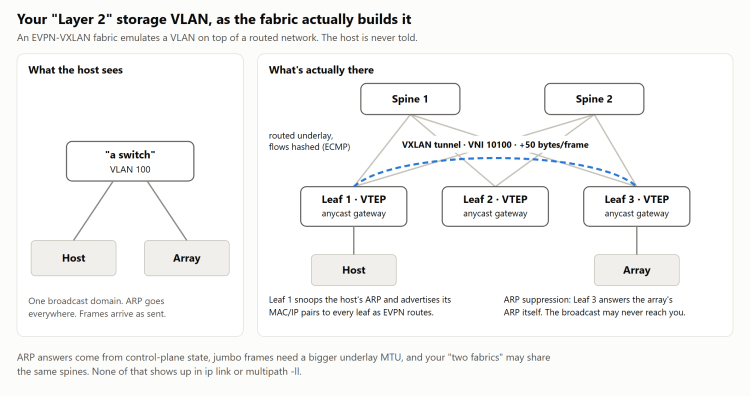
That works fine when it’s set up right. But the VLAN the host sees doesn’t tell you much about the path underneath it.
For example, a fabric using ARP suppression can answer an ARP request from its learned MAC/IP information. The array’s broadcast may never reach the host. If the host taught the fabric the wrong mapping by answering for an address on the wrong NIC, the fabric can keep supplying that answer.
So the ARP problem from part one isn’t limited to the two switches next to the host. Repeated changes in the MAC associated with an IP can also trigger duplicate-address detection on platforms that implement it.
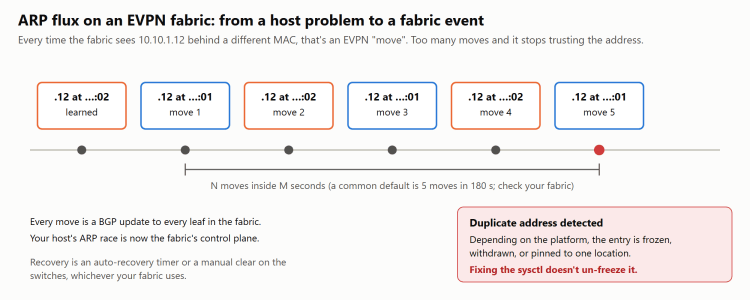
The thresholds and recovery in that picture are just an example. EVPN doesn’t standardize them, and every switch vendor does this a little differently. Some implementations can suppress an address or hold an entry until a timer expires or an administrator clears it. Fixing the host’s sysctls doesn’t necessarily clear the fabric’s existing state.
Encapsulation also needs MTU headroom. With an IPv4 underlay, the common Ethernet/IP/UDP/VXLAN encapsulation adds about 50 bytes relative to the carried IP packet before additional tags or other headers. Switches don’t all describe MTU at the same layer, so agree on the actual packet sizes with the network team. Many fabrics build the underlay at 9216 for exactly this reason. If the host is at 9000 and the underlay is also at 9000, look closer. Logins succeed, and full-sized frames disappear inside the fabric where you can’t see them. The full-sized ping test from part two is how you find out.
The underlay can hash flows across multiple paths too. And two storage VLANs may still use the same spines, leaf pair and control plane. That might be fine. Just don’t count it as the same isolation you’d get from two physical fabrics.
Routing all the way to the host is, if anything, easier to reason about.
Keep routed storage off the management default route
Imagine the host has a management NIC with a default route. The storage NICs have addresses, but nobody added routes to the remote array subnets.
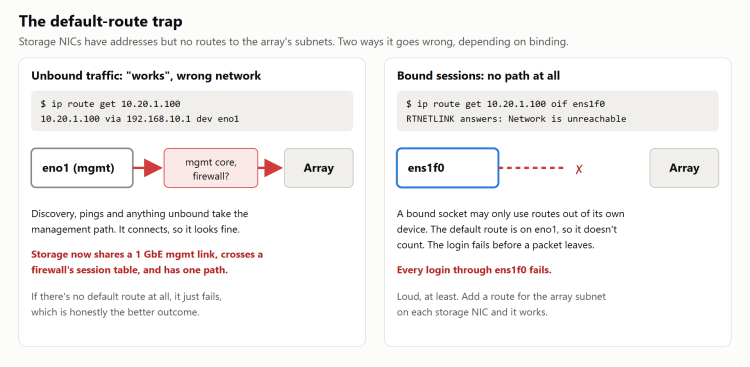
An unbound discovery connection or ping may leave through management and succeed. A session bound to a storage NIC can fail because there is no usable route through that device.
That difference can waste a lot of time. “But I can ping it” only helps if the ping tested the intended interface and route.
Keep the normal host default route where it belongs. Add specific routes for the array prefixes on the storage interfaces. If a stateful firewall is in that path, its session timeouts, failover behavior and storage support need to be part of the design too. If security allows it, I’d rather keep the firewall out of the storage path.
Configure a Linux storage route for each fabric
This is the routed layout I would start with:
| Fabric | Host interface and address | Host gateway | Array subnet |
|---|---|---|---|
| A | ens1f0, 10.10.1.11/24 | 10.10.1.1 | 10.20.1.0/24 |
| B | ens1f1, 10.10.2.11/24 | 10.10.2.1 | 10.20.2.0/24 |
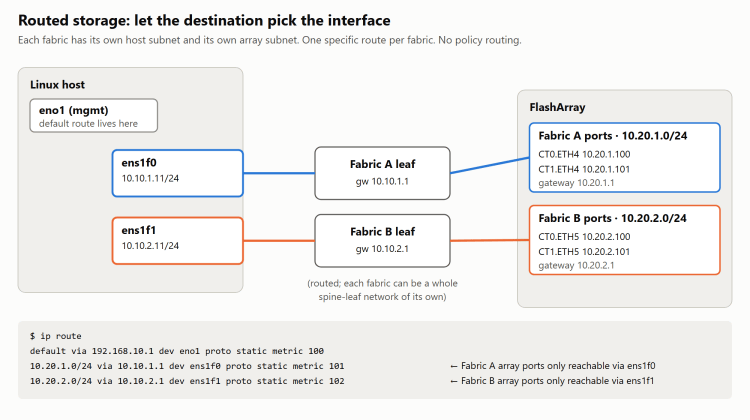
Traffic for the A array subnet uses the A interface. Traffic for the B subnet uses B. The destination address is enough to choose the interface, so we don’t need source-policy rules for this layout.
For existing NetworkManager profiles named storage-a and storage-b:
nmcli con mod storage-a ipv4.never-default yes \ +ipv4.routes "10.20.1.0/24 10.10.1.1"nmcli con mod storage-b ipv4.never-default yes \ +ipv4.routes "10.20.2.0/24 10.10.2.1"nmcli con up storage-anmcli con up storage-b
The profiles already need their static addresses and interface assignments. The + adds routes; review existing entries before repeating the commands. Reactivating a profile can interrupt traffic, so make these changes before storage login or during the node’s maintenance window.
With netplan, the corresponding storage-interface configuration looks like this. Merge it with the existing network definition:
network: version: 2 ethernets: ens1f0: addresses: [10.10.1.11/24] mtu: 9000 routes: - to: 10.20.1.0/24 via: 10.10.1.1 ens1f1: addresses: [10.10.2.11/24] mtu: 9000 routes: - to: 10.20.2.0/24 via: 10.10.2.1
For an ifupdown-based configuration, the A side would be:
# /etc/network/interfacesauto ens1f0iface ens1f0 inet static address 10.10.1.11/24 mtu 9000 up ip route replace 10.20.1.0/24 via 10.10.1.1 dev ens1f0
Repeat with the B addresses and interface. On a wicked-managed installation, the equivalent A-side route entry in /etc/sysconfig/network/ifroute-ens1f0 is:
10.20.1.0/24 10.10.1.1 - ens1f0
Use whichever configuration system actually manages the host. These are alternatives, not four steps to run on the same machine.
Then ask the kernel where it will send the traffic:
$ ip route get 10.20.1.10010.20.1.100 via 10.10.1.1 dev ens1f0 src 10.10.1.11 uid 0$ ip route get 10.20.2.10010.20.2.100 via 10.10.2.1 dev ens1f1 src 10.10.2.11 uid 0
Check the bound lookup as well:
ip route get 10.20.1.100 from 10.10.1.11 oif ens1f0ip route get 10.20.2.100 from 10.10.2.11 oif ens1f1
I’d still keep the initiator bindings from part one. They make the intended NIC explicit, and a mispaired connection can’t wander off down some other route.
iSCSI discovery may return portals on the other fabric
An iSCSI SendTargets response may include portals from both fabrics. Discovering through the A interface doesn’t necessarily mean the resulting node records contain only A portals.
Inspect the records. If discovery created wrong-fabric pairings, remove those unused records before login. For the example with .100 and .101 on each array fabric:
iscsiadm -m discovery -t sendtargets -p 10.20.1.100 -I ens1f0iscsiadm -m discovery -t sendtargets -p 10.20.2.100 -I ens1f1iscsiadm -m node# Remove only confirmed, unused wrong-fabric records.# Add -T TARGET_IQN if a portal contains records for multiple targets.iscsiadm -m node -p 10.20.2.100:3260 -I ens1f0 -o deleteiscsiadm -m node -p 10.20.2.101:3260 -I ens1f0 -o deleteiscsiadm -m node -p 10.20.1.100:3260 -I ens1f1 -o deleteiscsiadm -m node -p 10.20.1.101:3260 -I ens1f1 -o deleteiscsiadm -m node -I ens1f0 --loginiscsiadm -m node -I ens1f1 --login
If something else manages discovery and login, make the equivalent change there or it may recreate the records. That matters on OpenShift, which is the next post.
Two reachable array ports on each fabric gives this host four paths per volume. Make sure each fabric reaches the required controllers and that your array’s supported topology tolerates the failures you intend to test. Paths that cross between fabrics raise the path count without adding much redundancy.
For NVMe/TCP, inspect the discovery results and nvme list-subsys for the same pairing problem. Connect to the intended portals with the matching --host-iface and --host-traddr values.
And check the array’s return routes. Each target-side connection needs a valid route back to the initiating host address through the intended fabric. Fixing the host side doesn’t fix the array side, or anything in between.
What if all the array ports use one subnet?
You can have both storage NICs reach the same remote prefix, such as 10.20.0.0/24. Each needs a usable route through its own gateway. Interface binding then constrains which one a storage connection uses.
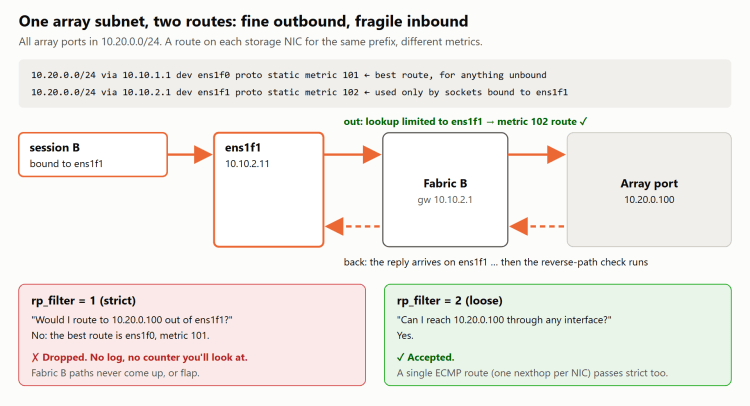
For a temporary test:
ip route add 10.20.0.0/24 via 10.10.1.1 dev ens1f0 metric 101ip route add 10.20.0.0/24 via 10.10.2.1 dev ens1f1 metric 102ip route get 10.20.0.100 from 10.10.2.11 oif ens1f1
Persist the intended routes through your network manager. Unbound traffic normally prefers the lower metric. A connection bound to ens1f1 needs the route through ens1f1.
The reverse-path check can get in the way again. Strict rp_filter may consider ens1f0 the best way back to the array and reject traffic arriving on ens1f1. Loose mode on the storage interfaces accommodates that asymmetry. See the settings in part one.
An alternative is a single route with two equal-cost next hops:
ip route add 10.20.0.0/24 \ nexthop via 10.10.1.1 dev ens1f0 \ nexthop via 10.10.2.1 dev ens1f1
That is an alternative to the two separate routes, not an additional command for the same example. Linux reverse-path validation can accept the incoming interface when it is among the route’s next hops. Test that on your kernel before relying on it, including the binding and what happens after a reboot.
The harder question is where those routes go after they leave the host. If both can reach every array port by crossing between fabrics in the core, some paths share more infrastructure than their session count suggests. I would still ask for separate array prefixes per fabric if that is an option.
When I would use a Linux VRF for storage
Sometimes storage needs a separate routing table. It may need its own default route, or its addresses may overlap another network. A Linux VRF gives a group of interfaces a routing domain of their own.
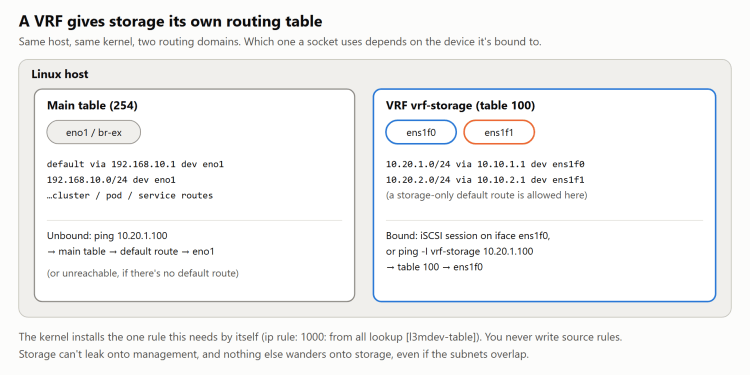
Here is a temporary configuration to show the pieces. Table 100 must be unused. Do this before attaching storage, because moving an interface into a VRF moves connected routes and can drop other routes and sessions:
ip link add vrf-storage type vrf table 100ip link set vrf-storage upip route add table 100 unreachable default metric 4278198272ip link set ens1f0 master vrf-storageip link set ens1f1 master vrf-storageip route add vrf vrf-storage 10.20.1.0/24 via 10.10.1.1 dev ens1f0ip route add vrf vrf-storage 10.20.2.0/24 via 10.10.2.1 dev ens1f1
The unreachable default gives a lookup with no more specific storage route a terminal result. Without it, a lookup that misses in the VRF table can fall through to later policy rules. The kernel VRF documentation includes that default route in its setup.
The kernel also installs an l3mdev lookup rule for VRFs. Check its position against any existing rules. A VRF organizes routing; it isn’t a security boundary equivalent to a separate network namespace or firewall.
Verify it:
ip vrf showip ruleip route show table 100ip route get 10.20.1.100 vrf vrf-storageip route get 10.20.2.100 vrf vrf-storageping -c 3 -I vrf-storage 10.20.1.100ip route get 10.20.1.100
The VRF lookups should use the matching storage interfaces. The last command checks what an ordinary main-table lookup does; it may still use management’s default route. Don’t treat a successful unbound ping as a VRF test.
Initiators that bind to the storage member interfaces can use their VRF routing context. Discovery, health checks and other unbound tools need attention. Not every tool will pick the VRF on its own, so test the actual initiator and monitoring stack, including reconnects and a reboot.
The ip commands above do not survive a reboot. Persist the VRF, member assignments, routes and fallback behavior through your host’s network configuration system. With NetworkManager and the existing storage-a and storage-b profiles, that looks like this:
# The VRF and its tablenmcli con add type vrf con-name vrf-storage ifname vrf-storage table 100 \ ipv4.method disabled ipv6.method disabled# Make the storage profiles VRF ports (newer NetworkManager also# accepts connection.controller / connection.port-type)nmcli con mod storage-a master vrf-storage slave-type vrfnmcli con mod storage-b master vrf-storage slave-type vrf# Routes on the ports land in the VRF's tablenmcli con mod storage-a ipv4.routes "10.20.1.0/24 10.10.1.1"nmcli con mod storage-b ipv4.routes "10.20.2.0/24 10.10.2.1"# The unreachable fallbacknmcli con mod storage-a +ipv4.routes "0.0.0.0/0 4278198272 type=unreachable table=100"nmcli con up vrf-storagenmcli con up storage-anmcli con up storage-b
Unlike the earlier example, these ipv4.routes lines have no +, so they replace the profiles’ main-table routes rather than adding to them. The fallback route belongs to whichever profile carries it, and older NetworkManager releases don’t support the type attribute. Read the result back with ip route show table 100, including with that profile down.
ARP and reverse-path settings still need to match the topology inside the VRF.
Policy routing is also an option
You can solve this with a routing table per source and rules such as ip rule from 10.10.1.11 lookup 101. That is a valid design when you need source-based selection.
For the two-fabric example, I would rather use distinct destination prefixes and explicit bindings. It leaves fewer things to update when an address changes. If the requirement is a separate routing domain, I would look at a VRF.
Once the connections are up, check every NIC/portal pairing and run the failure tests under I/O. Take down A, verify B keeps working, restore A, then test B. Also verify that losing a storage route doesn’t send a new connection through management.
That’s really all there is to routed storage. The routing itself is the easy part. Most of the time goes into checking that storage is actually using the route you think it is.
Next: OpenShift storage networking with NNCP and MachineConfig.


3 thoughts on “Routed iSCSI and NVMe/TCP: Linux Routes and VRFs”